Turn your list into revenue —
without the TCPA risk.
Meet Connecta — Hostcomm's US AI predictive dialer. Cloud-based, nothing to install: predictive, power, preview and manual modes with a live abandon-rate cap, STIR/SHAKEN attestation via our US carrier, caller-ID reputation monitoring, Precall SMS, a built-in AI voice agent, AI review of every call and Salesforce, HubSpot, Pipedrive and Zoho CRM screen-pop. Inbound, outbound and blended on one platform.
Questions about Connecta? We'll answer them.
Send us a message and we reply within one business day — or call us now.
Connecta is Hostcomm's US-hosted predictive dialer that helps outbound teams connect with more live customers — with caller-ID reputation monitoring, Precall SMS warm-up and a built-in AI voice agent — while staying inside TCPA, FCC and STIR/SHAKEN rules. Same-day setup, no software to install, billed month-to-month.
Last updated
What's new
this release.
Interaction Analytics
Every call is transcribed from its recording after it ends and reviewed by AI: a summary, customer sentiment (overall and at the end), how long the agent talked, script adherence, objections and topics.
Compliance checks on every call
The review checks whether the recording notice was given, whether the AI disclosure was given, and whether an opt-out was requested and honoured — on every call, not a sample.
Scorecards with evidence
Define what good looks like — yes/no checks, objectives met and 1–5 scores, from templates or your own, per campaign. The AI answers each item for every call and quotes the transcript as evidence.
Click a quote, hear the moment
The analysis sits under the recording player. Click any quote or transcript line and the audio jumps to that moment.
Triggers
“When X, then Y” rules on what the AI finds: flag the call for review, email someone, tag the lead, add the number to do-not-call (opt-out rules), or send a signed webhook to another system.
Review queue & results
Flagged calls wait in a queue for a manager to check and mark reviewed. The results view shows scorecard pass rates, compliance flags, top objections, sentiment and per-agent figures — every number opens the calls behind it.
Every call recorded
Calls that never reached an agent — voicemail, no answer, AI-handled — are now stored and linked in call history too, without ever overwriting an agent recording.
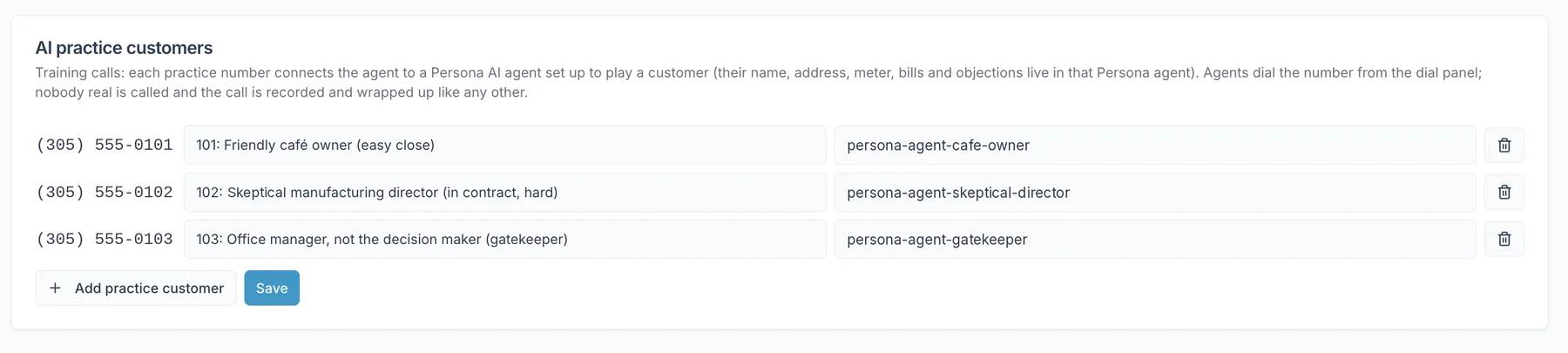
AI practice customers
New agents practise against AI customers with their own personality and objections, who warm to clear, honest agents and push back on pushy or vague ones. Started from My queue, with hold music, the script, recording and the outcome form — exactly like a real call.
Agent Assist, more reliable
Live transcription and tips during the call; at the end, a summary pre-fills the wrap-up and stays on the call, the lead’s history and My Calls. If transcription has a problem, the call carries on and Assist goes quiet.
Wallboard modes
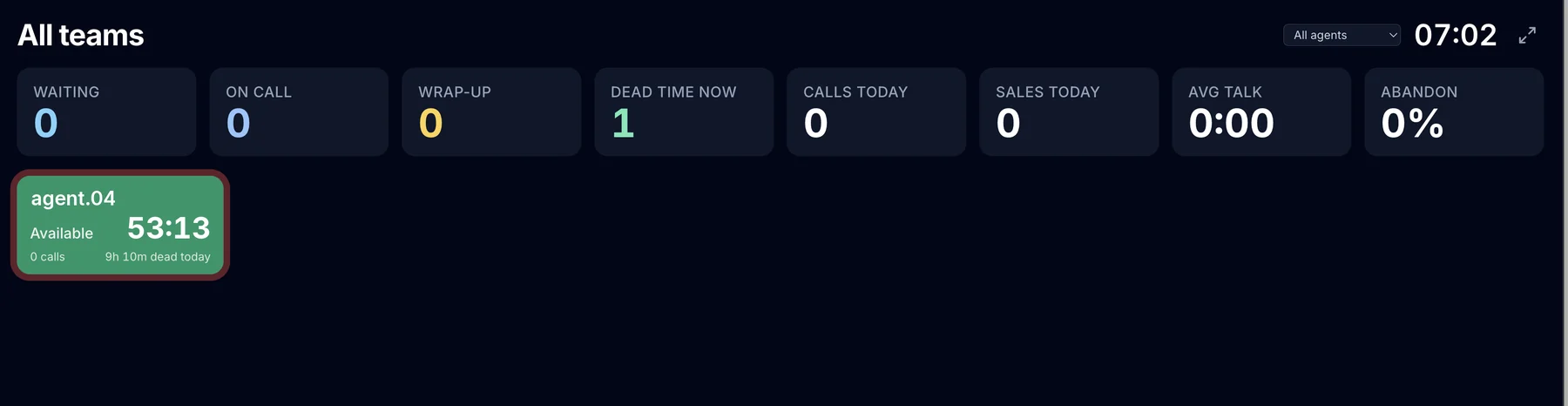
A “needs attention” mode that shows only the agents and queues that need action, and a figures-only mode for big screens.
Connecta Reach
An AI that does the “get through to the right person” part of B2B calls: navigates phone menus, waits on hold, asks the receptionist for the named contact, leaves a voicemail when invited, takes a callback time — and hands over to a human agent once the right person is on the line.
Built to keep your numbers
connecting.
Most dialers just place calls. Connecta protects the thing that actually drives revenue — your answer rate — and pairs human agents with AI on one platform, not two contracts.
Catch a number going “Spam Likely” before your connect rate does
Connecta links to calleridreputation.com to monitor your outbound numbers across the major spam-flagging databases and track their STIR/SHAKEN attestation. When a number starts getting flagged, it surfaces on the dashboard — so you can rest it and swap in a clean one before answer rates collapse.
Warm the lead with an SMS, seconds before you dial
Precall sends a short, personalised text just ahead of the call, so the number that rings is one the customer already recognises. If they reply STOP, the call is cancelled automatically and the number is suppressed across every campaign.
An AI voice agent on the same platform — not bolted on
Run the AI voice agent as a safety net when no agent is free, or AI-first with a live hand-over to a human, transcript and record included. Uncertain answering-machine results go to the AI instead of a silent drop, every AI-handled call plays a disclosure, and Agent Assist gives human agents live transcription, summaries and prompts.
The right CRM record on screen the moment the call connects
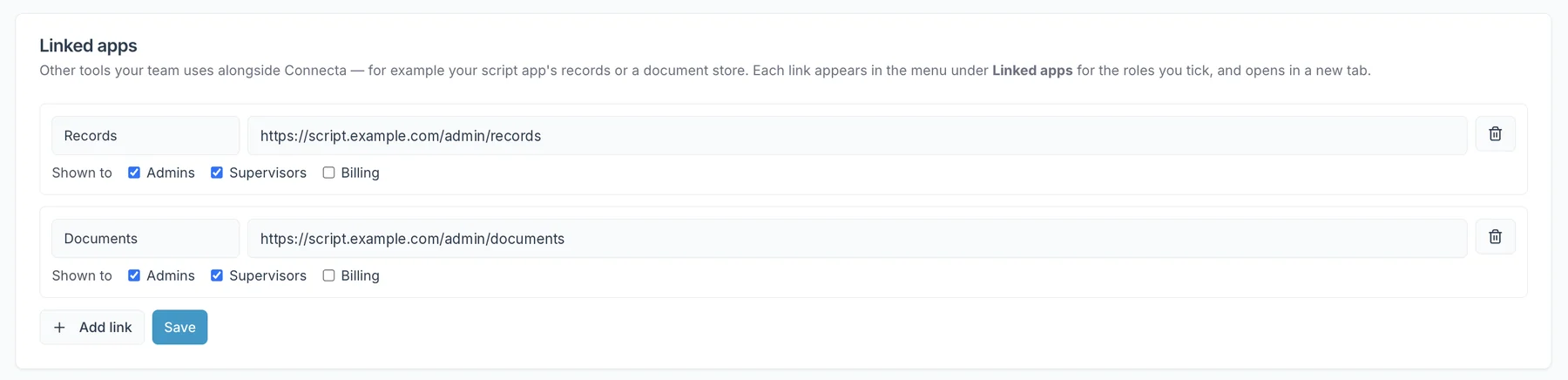
Connecta matches the live call to your CRM and pops the customer record the instant your agent answers, then writes the outcome back on disposition. Salesforce, HubSpot, Pipedrive, Zoho CRM and FLG360 connectors are live, and linked apps put your other tools in the Connecta menu.
Frequency limits and calling hours, enforced on every dial
Daily and weekly contact limits per number, daily caps per outbound number, and calling hours per campaign or organization — including days of the week — applied to all automatic dialing. Callbacks the customer booked are always honoured.
Listen, whisper, barge — with amber and red timer warnings
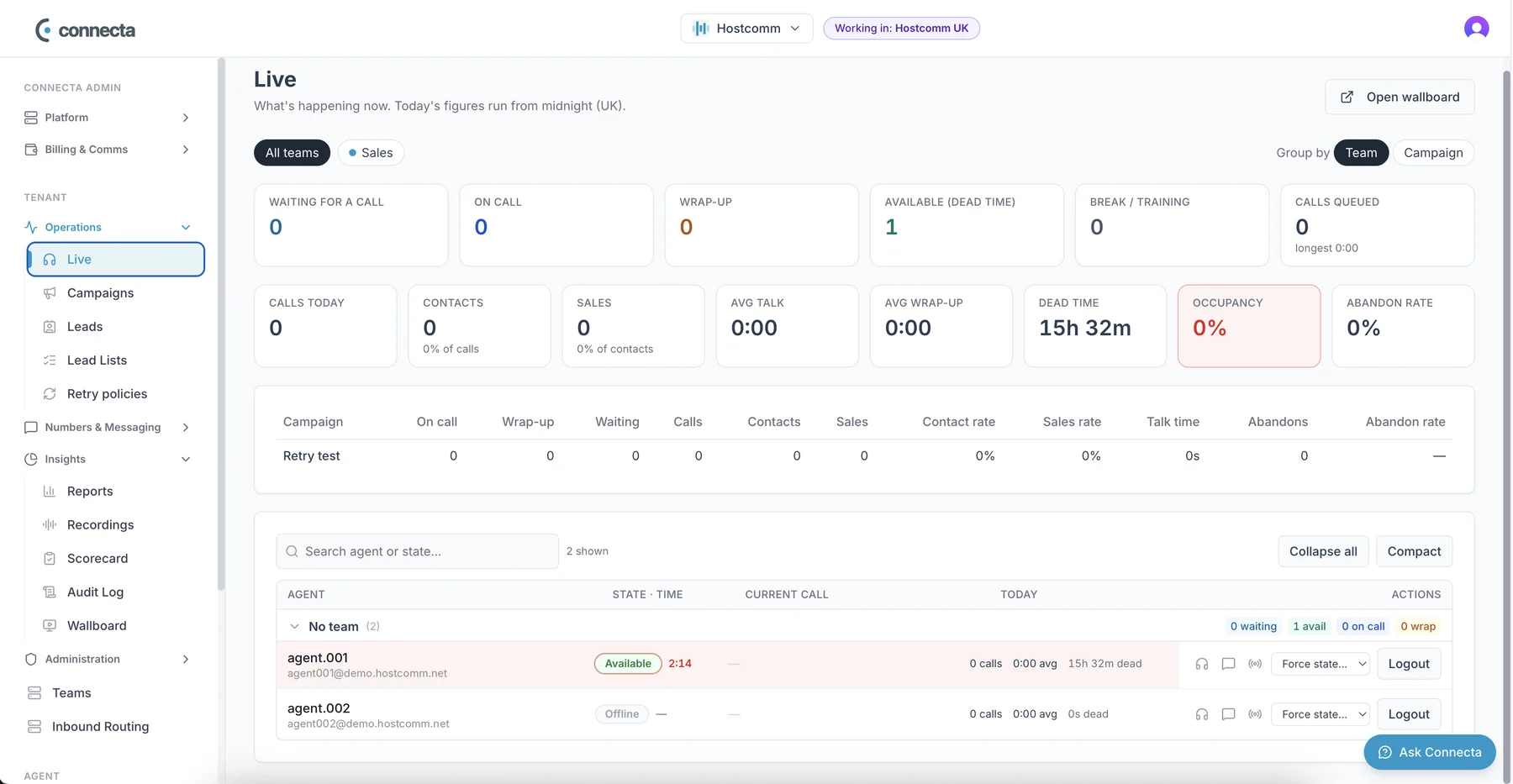
Supervisors see every agent’s state and timer, with amber and red warnings before a wrap-up or pause runs long, plus listen-in, whisper and barge and a full-screen wallboard for the wall.
The right lead, to the right agent, at the right time
Assign teams and agents per campaign and rank campaigns by priority. Choose the dial order — oldest, newest, fewest calls, longest since last call or random — with retries timed by outcome and an optional cap on calls per lead.
From first call to signed LOA in one conversation
A guided qualification form inside the live call — company, decision makers, sites, meters and rates — then a one-click intro email and a Letter of Authorization e-signed through DocuSign, tracked and stored automatically. Built for commercial energy brokers.
New starters rehearse on AI customers before real ones
Trainees practise realistic AI role-play calls — objections, gatekeepers, callbacks — inside the same platform, so their first live call isn’t their first call.
Every seat,
one platform.
Supervisors get a live console over the whole tenant; agents get a workspace that pops the right record the moment a call connects, and AI customers to practise on first. No tab-juggling, no second tool.
Watch every live call —
step in when it matters.
A real-time view of every agent's state and timer — with amber and red warnings before a wrap-up or pause runs long — and every live call, refreshed every two seconds. Listen, whisper, or barge on any active call, and keep an eye on number health and abandon rate before they cost you connects.
- →Agent state timers with amber and red warnings
- →Listen / whisper / barge on any in-progress call
- →Full-screen wallboard for wall displays, one click from the menu
- →Teams with team admins, isolation and team-level thresholds
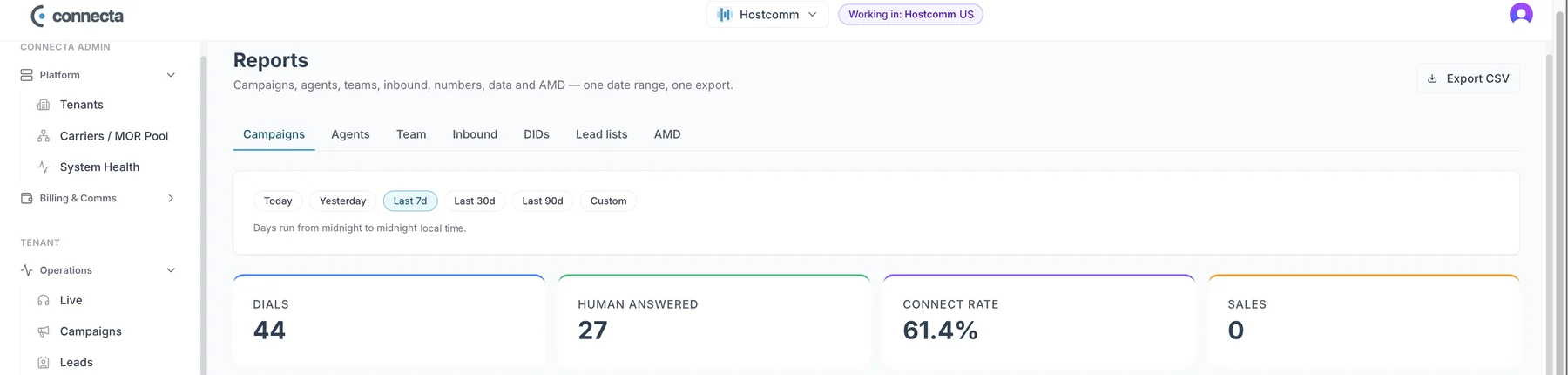
- →Reports by campaign, agent, team, number and AMD — with period comparisons
The right record pops
the second they answer.
When a call connects, the agent sees the matching lead from your CRM — no searching. Agent Assist transcribes the call live, suggests what to say next and writes the call summary, while one-click transfer and call controls keep the conversation moving.
Using Zoho CRM? Dial raw lists in Connecta and push only qualified leads to Zoho →
Selling energy? Qualify and get the LOA signed on the call →
- →CRM screen-pop (Salesforce, HubSpot, Pipedrive, Zoho CRM & FLG360)
- →Agent Assist: live transcription, prompts and call summaries
- →Find any lead by name, company, ZIP or number and call in one click
- →Agent queue, call history and wrap-up with outcomes
Their first live call
isn't their first call.
New starters rehearse on AI customers with their own personality and objections — they warm to clear, honest agents and push back on pushy or vague ones. A practice call starts from My queue and runs exactly like a real one: hold music, the script, recording and the outcome form.
How the AI training simulator works →
- →Practise the real script in the real workspace
- →No live leads burned on training
- →Test a new campaign end to end — script, recording, outcomes — before it goes live
- →Admins add scenarios under Settings → AI practice customers
Every call reviewed —
not a 2% sample.
After each call ends, Connecta transcribes the recording and reviews it: summary, sentiment, talk time, script adherence and objections, plus compliance checks for the recording notice, the AI disclosure and opt-outs. Your scorecard is answered for every call, with the transcript line as evidence — click it and the recording jumps to that moment.
- →Scorecards: yes/no checks, objectives and 1–5 scores, per campaign
- →Triggers: flag for review, email, tag the lead, add an opt-out to do-not-call, signed webhook
- →Review queue for flagged calls; results by agent with every number drilling into the calls
- →Switch on per organization and per campaign
Not a mock-up —
Connecta, as your team sees it.
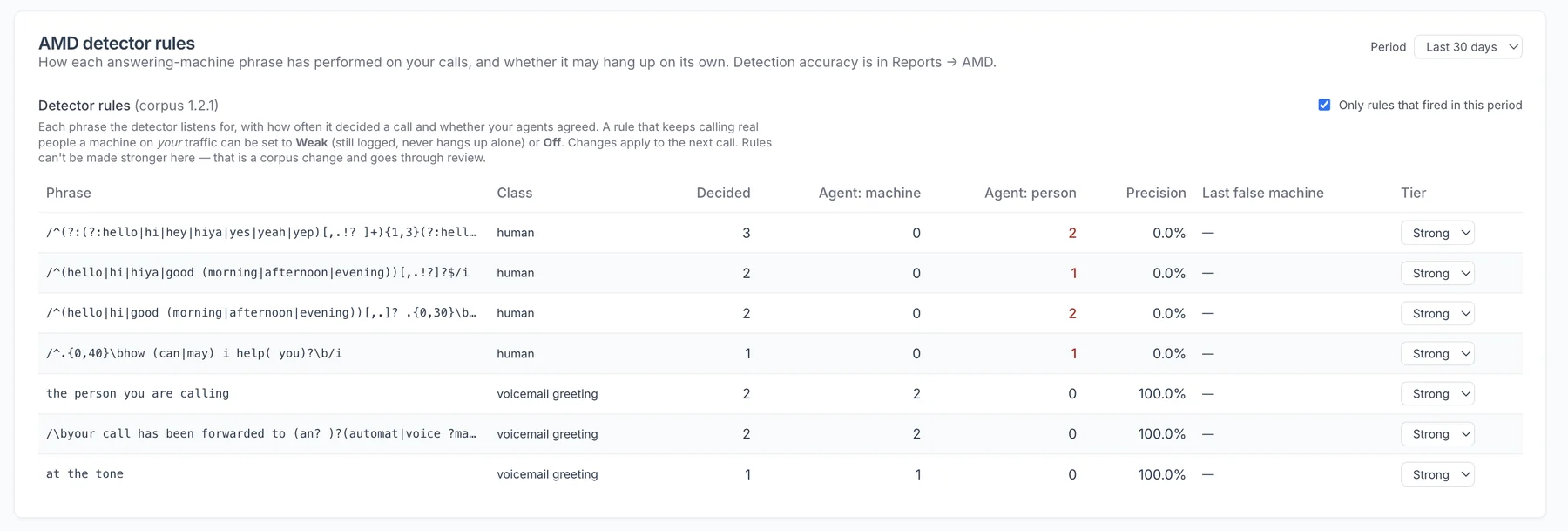
Screens from the live platform, shown with demo data. Click any screen to open it full size.
Match the dialer
to the campaign.
Switch dialing mode per campaign, per list, per team — without leaving the platform or calling support.
Predictive
Dials multiple numbers per agent and connects only live answers. Maximum talk time for large, clean lists.
Power
One call per available agent, so it never abandons. Faster than manual, more controlled than predictive.
Preview
Agents see the lead and record before the call connects. Best for high-value or complex accounts.
Manual
Click-to-call with full screen pop and logging. The compliant default when consent rules demand it.
Every call signed,
scrubbed, and logged.
TCPA exposure is the most expensive thing most US contact centers underestimate — statutory damages run $500 per call, trebled to $1,500 for willful violations, with no cap. The dialer is built so the safe path is the default one.
Hostcomm provides the controls and the audit trail. Your consent and policies determine compliance — and nothing here is legal advice.
STIR/SHAKEN attestation
SIGNEDUS outbound calls carry A-level attestation through our US carrier, so carriers are less likely to label you “Spam Likely” — and Connecta reads each number’s attestation and spam status continuously.
DNC + reassigned-number scrubbing
SCRUBBEDLists are scrubbed against the National Do Not Call Registry and reassigned-number databases before a single number is dialed.
Calling hours on every automatic dial
TIMEDSet calling hours per campaign or per organization, including days of the week, in the contact’s local time. The default is the federal 8am–9pm; run Florida, Oklahoma, Maryland or Washington contacts with an 8pm stop.
Contact-frequency limits
CAPPEDDaily and weekly limits per number — so you can match state caps such as Florida’s three calls in 24 hours — with callbacks the customer booked always honoured.
Abandon-rate cap and abandoned-call message
PACEDPredictive pacing pauses automatically at your abandon-rate ceiling (for example the TSR’s 3%), and a recorded message plays if no agent is free.
DNC and STOP on every dial path
SUPPRESSEDDo-not-call and SMS STOP are respected in manual, preview, power and predictive dialing alike; a lead-level DNC covers the number across every campaign.
AI disclosure on AI-handled calls
DISCLOSEDEvery call handled by the AI voice agent plays a disclosure. The FCC treats AI voices as “artificial voice” under the TCPA, so the same consent rules apply.
Consent records and audit log
LOGGEDAttach each contact’s consent record (source, timestamp, seller). Opt-outs, revocations, every dial attempt and every configuration change are logged and exportable.
One platform.
No add-on invoices.
Dialing
- ✓Preview, power (progressive), predictive and manual dialing — set per campaign
- ✓Predictive pacing with a live abandon-rate cap and automatic pausing
- ✓Abandoned-call recorded message played automatically, and the number held back from redial afterwards
- ✓Precall SMS: text the customer before the call — the call is cancelled automatically if they reply STOP
- ✓Answering-machine detection with three-way routing (human, machine, uncertain → AI agent), reporting and tunable rules
- ✓Find any lead by name, company, ZIP code or number and call it in one click, or dial a number by hand
Campaigns, leads & lists
- ✓Teams and individual agents assigned per campaign, with campaign priority
- ✓Dial order per campaign: oldest/newest first, fewest calls first, longest since last call or random
- ✓Retry policies by call outcome, timed automatically, with an optional maximum calls per lead
- ✓Bulk lead reset by list, status and last call result, with a count before anything changes
- ✓Lead lists with upload, duplicate checks and flexible imported fields
- ✓Callbacks owned by an agent or a team, or dialed automatically when due
- ✓Lead actions: do-not-call across all campaigns, book a callback, export to CSV
Compliance controls
- ✓Calling hours per campaign or per organization, including days of the week, on all automatic dialing
- ✓Contact-frequency limits per number, daily and weekly; booked callbacks always honoured
- ✓Do-not-call and SMS STOP respected on every dial path — manual, preview, power and predictive
- ✓Valid caller ID on every call, daily call limits per number, caller-ID health monitoring and rotation
- ✓STIR/SHAKEN A-level attestation via our US carrier
- ✓Full audit log and call recordings with retention rules
- ✓Every call recorded and stored — including voicemail, no-answer and AI-handled calls
Interaction Analytics & QA
- ✓Every call transcribed from its recording and reviewed by AI after it ends
- ✓Summary, customer sentiment (overall and at the end), agent talk time, script adherence, objections and topics
- ✓Compliance checks on every call: recording notice given, AI disclosure given, opt-out requested and honoured
- ✓Scorecards: yes/no checks, objectives met and 1–5 scores, from templates or your own, limited to chosen campaigns
- ✓AI answers every scorecard item for every call, quoting the transcript as evidence
- ✓Click a quote or transcript line to jump the recording to that moment
- ✓Triggers: flag for review, email someone, tag the lead, add to do-not-call (opt-out rules), send a signed webhook
- ✓Review queue for flagged calls, and a results view of pass rates, compliance flags, objections, sentiment and per-agent figures
AI
- ✓AI voice agent to answer or back up calls — AI first, or as a safety net when no agent is free
- ✓Live hand-over from the AI agent to a human, with transcript and record
- ✓Agent Assist: live transcription and tips during the call; a summary that pre-fills the wrap-up and stays on the call record
- ✓AI disclosure played on every AI-handled call
- ✓AI practice customers: scenario-based AI customers with their own personality and objections, started from My queue and run exactly like a real call
- ✓Agent Assist and Interaction Analytics switchable per organization and per campaign
Agents
- ✓Browser softphone (WebRTC) — no desk phone, no install
- ✓Agent queue, call history and wrap-up with outcomes
- ✓Built-in test numbers for checking everything end to end
- ✓PCI DSS Level 1 card capture mid-call
Supervisors & managers
- ✓Live view of every agent's state and timers, with amber and red warnings
- ✓Listen, whisper and barge on any call
- ✓Wall-screen wallboard with a “needs attention” mode and a figures-only big-screen mode
- ✓Teams with team admins, isolation and team-level thresholds
- ✓Reports on campaigns, agents, teams, outbound, inbound, data, numbers and AMD — with date presets and comparisons
Inbound
- ✓Inbound routing to people or the AI agent, with number mapping
- ✓Inbound calls reach agents during predictive dialing
Integrations & platform
- ✓CRM connectors for Salesforce, HubSpot, Pipedrive, Zoho CRM and FLG360: screen-pop and outcome write-back
- ✓Zoho CRM qualified-lead push: leads an agent qualifies are created in Zoho with the call, notes, AI call summary and recording link
- ✓Script app hook: open your own call script inside the live call and send the outcome back
- ✓Linked apps: put your other tools in the Connecta menu, per role
- ✓Multi-client, role-based access: admin, supervisor, billing and agent
- ✓Client costs, SMS billing, and a system health page with one-click server resizing
Connecta Script
- ✓Guided qualification form inside the live call: company, decision makers, sites, meters and rates
- ✓Prefilled from the lead — and from the previous record when a customer calls back
- ✓Outcome buttons that write the result straight back to the dialer
- ✓One-click introduction email to the decision maker
- ✓E-signature for Letters of Authorization (LOA) through DocuSign, with signing status tracked automatically
- ✓Document repository: every signed document stored securely, searchable, one click to download
- ✓Automatic export of each record to your CRM or back office, with automatic retries if it fails
- ✓Records back office with search, filters, full record view and CSV download, under Connecta branding
Connecta vs Convoso, ReadyMode, CallTools and Five9.
| Convoso | ReadyMode | CallTools | Five9 | Connecta | |
|---|---|---|---|---|---|
| Free trial | 40+ seats only | Not published | Yes | Not published | Yes — on a live campaign |
| Contract | Negotiated | Not published | Not published | Multi-year typical | Month-to-month |
| Caller-ID reputation | Yes | Yes | Not published | Add-on | Yes |
| AI voice agent | Add-on | No | No | Higher tier | Same platform, same contract |
| Pre-call SMS warm-up | No | No | No | No | Yes (Precall) |
| Dialing modes | 4 | 4 | 4 | 4 | 4 |
Competitor figures are published list prices and terms taken from each vendor's pricing pages and public listings; several price by quote only, so a negotiated figure may differ. Verify with the vendor before purchase. If a cell is out of date, tell us and we'll correct it. Competitor figures verified 3 September 2026.
Every claim on one page, in checkable form.
| Dialing modes | Predictive, power (progressive), preview and manual — set per campaign, changeable mid-flight; the pacer picks the change up on its next cycle |
|---|---|
| Predictive pacing | Dial ratio set per campaign; a live abandon-rate cap pauses the campaign automatically when the rate reaches your ceiling (for example the FTC Telemarketing Sales Rule's 3%) |
| Abandoned calls | Recorded message played automatically when no agent is free, and the number held back from redial afterwards |
| Answer-machine detection | Three-way routing: human → agent, machine → drop or message, uncertain → AI voice agent (never a silent drop); AMD reporting and tunable rules |
| AI voice agent modes | Off · Safety net (AI takes calls when no agent is free) · AI first (AI opens, hands over live to a human) — per campaign |
| AI disclosure | Disclosure played on every AI-handled call |
| Agent Assist | Live transcription and tips during the call; end-of-call summary pre-fills the wrap-up and is kept on the call, the lead’s history and My Calls; on/off per organization and per campaign; calls continue normally if transcription fails |
| AI practice customers | Admin-defined scenarios, each with its own personality, objections and made-up account details; the AI warms to clear, honest agents and pushes back on pushy or vague ones; started from My queue with hold music, script, recording and outcome form |
| Interaction Analytics | Every call transcribed from its recording after it ends: summary, sentiment (overall and at the end), agent talk time, script adherence, objections and topics; usage metered per organization |
| Compliance checks | Per call: recording notice given, AI disclosure given, opt-out requested and honoured |
| Scorecards | Yes/no checks, objectives met and 1–5 scores, from templates or your own, limitable to campaigns; every item answered for every call with a quoted transcript line; click a quote to jump the recording |
| Triggers | When-then rules on AI findings: flag for review, email, tag the lead, add to do-not-call (opt-out rules only), signed webhook |
| QA review | Review queue for flagged calls; results view of pass rates, compliance flags, top objections, sentiment and per-agent figures, each drilling into the calls behind it |
| AI greeting | Rendered from your script in your chosen voice and cached, so it plays the instant the call connects |
| STIR/SHAKEN | STIR/SHAKEN A-level attestation via our US carrier on US outbound calls |
| Caller-ID reputation | Continuous per-number health via calleridreputation.com; flagged numbers pulled from rotation automatically |
| CLI strategy | Fixed single CLI, pool, or per-DID rotation across the active outbound set — chosen per campaign; valid caller ID on every call |
| Contact-frequency limits | Per-number daily and weekly limits and per-number daily dial caps, enforced on every dial; callbacks the customer booked are always honoured |
| Precall SMS | Personalised text sent before the dial; if the customer replies STOP the call is cancelled automatically and the number suppressed across all campaigns |
| Do-not-call | DNC and SMS STOP respected on every dial path; lead-level do-not-call covers the number across all campaigns |
| DNC & reassigned numbers | National DNC and reassigned-number scrubbing before each dial |
| Calling hours | Set per campaign or per organization, including days of the week, and applied to all automatic dialing in the contact's local time — defaults to the federal 8am–9pm; set narrower windows where state law requires (e.g. Florida 8am–8pm) |
| Consent records | Consent record attached per lead (source, timestamp, seller); opt-outs and revocations timestamped |
| Campaign assignment | Teams and individual agents per campaign; campaign priority decides which campaign gets a free agent first |
| Dial order | Oldest first, newest first, fewest calls first, longest since last call, or random — with retries or new leads first |
| Retry policies | Per-outcome rules (no answer, busy, voicemail, callback requested) timed automatically, with an optional maximum calls per lead |
| Lead management | Upload with duplicate checks and flexible imported fields; one-click search by name, company, ZIP or number; bulk reset by list, status and last result (count shown first); CSV export |
| Callbacks | Owned by an agent or a team, or dialed automatically when due |
| Recording & retention | Per-campaign: on/off, announcement played, agent pause allowed, retention period — retention enforced by the platform; every call stored and linked in call history, including voicemail, no-answer and AI-handled calls |
| Audit log | Every configuration change logged with who, what and when; exportable |
| CRM screen-pop | Salesforce, HubSpot, Pipedrive, Zoho CRM and FLG360 — record pops on answer, outcome written back on disposition |
| Script app hook | Open your own call script inside the live call and send the outcome back; or use Connecta Script |
| Connecta Script | Guided in-call qualification (company, decision makers, sites, meters, rates), one-click intro email, DocuSign LOA e-signature with status tracking, signed-document repository, auto-export to CRM with retries |
| Supervisor console | Live agent state and timers with amber/red warnings, campaign pacing and auto-pause reasons; listen, whisper, barge on any call; wallboard with “needs attention” and figures-only modes |
| Teams | Team admins, team isolation and team-level thresholds |
| Transfers | Blind, attended and three-way, on a hot-key, recording continuous across the handover |
| Payments | PCI DSS Level 1 card capture mid-call — agents never see the card number |
| Inbound | Routing to people or the AI agent with number mapping; inbound calls reach agents during predictive dialing; ACD, IVR, business hours and queues |
| Agent client | Browser only (WebRTC) — no desk phone, no desktop software, no VPN; built-in test numbers |
| Multi-client | Separate clients, data, numbers and reporting under one admin; roles for admin, supervisor, billing and agent; client costs and SMS billing |
| Linked apps | Your other tools in the Connecta menu, per role |
| Reporting | Campaigns, agents, teams, outbound, inbound, data, numbers and answering-machine detection — with date presets and period comparisons |
| Hosting & support | AWS US region, dedicated instance per customer, system health page with one-click server resizing, 24/7 US support |
| Contract | Month-to-month; same-day setup; free trial on a live campaign |
Straight answers.
What TCPA controls does Connecta include?
National DNC and reassigned-number scrubbing before each dial, calling hours per campaign or organization (including days of the week) in the contact’s local time, a consent record per lead, do-not-call and SMS STOP honoured on every dial path, daily and weekly contact-frequency limits per number, per-number dial caps, and a timestamped audit log of every attempt and configuration change. Hostcomm provides the controls and the audit trail; whether a campaign is compliant depends on your own consent and policies, and this isn’t legal advice.
Can a predictive dialer keep abandoned calls under the 3% limit automatically?
Yes. Connecta’s predictive pacer runs with a live abandon-rate cap set per campaign — for example the FTC Telemarketing Sales Rule’s 3% — and pauses the campaign automatically when the rate reaches it. When no agent is free, a recorded abandoned-call message plays automatically and the number is held back from redial. The cap and the message apply whether or not you also use the AI safety net.
Is there a dialer that texts customers before calling and cancels the call if they reply STOP?
Yes — that is Connecta’s Precall SMS. A short personalised text goes out before the dial so the customer recognises the number that rings. If they reply STOP, the call is cancelled automatically and the number is suppressed across every campaign. Text messages have their own consent rules (and in some states, such as Texas, marketing texts count as telephone solicitation), so check your consent covers SMS.
How does Connecta handle state calling-hour and call-frequency rules?
Calling hours are set per campaign or per organization, including days of the week, and apply to all automatic dialing. The default is the federal 8am–9pm in the contact’s local time; several states are narrower — Florida, Oklahoma, Maryland and Washington stop at 8pm, and Texas has later Sunday hours — so run those contacts in a campaign with the tighter window. Daily and weekly contact limits per number let you match state caps such as Florida’s three calls in 24 hours. This isn’t legal advice.
How does Connecta handle STIR/SHAKEN?
US outbound calls carry STIR/SHAKEN A-level attestation via our US carrier. Connecta also reads each number’s attestation and spam-flag status through calleridreputation.com, pulls flagged numbers out of rotation automatically, and applies daily call limits per number.
What happens when answer-machine detection isn’t sure?
Most dialers make a binary human-or-machine call, and when they get it wrong they drop a live person into silence. Connecta routes three ways: human to an agent, machine to a drop or message, and uncertain to the AI voice agent, which talks to whoever answered and hands over live to a human if it’s a real conversation. AMD outcomes are reported and the detection rules are tunable.
Do AI-handled calls tell the customer they are speaking to AI?
Yes. Connecta plays an AI disclosure on every AI-handled call. The FCC treats AI-generated voices as “artificial voice” under the TCPA, so the usual consent rules for those calls still apply.
Can new agents practise on AI customers before taking live calls?
Yes. Connecta’s AI practice customers are scenarios your admins set up — a friendly small-business owner, a skeptical director who is in contract, a gatekeeper — each with its own personality, objections and made-up account details. The AI warms to clear, honest agents and pushes back on pushy or vague ones. Agents start a practice call from My queue and it runs exactly like a real call: hold music, the script, recording and the outcome form. Nobody real is called, and the same call path lets you test a campaign end to end before it goes live.
Can AI review every call for quality and compliance?
Yes. Connecta’s Interaction Analytics transcribes every call from its recording after it ends and reviews it: summary, sentiment, agent talk time, script adherence, objections, and compliance checks for the recording notice, the AI disclosure and whether an opt-out was requested and honoured. Your own scorecard is answered for every call with a quoted line from the transcript as evidence, and clicking the quote jumps the recording to that moment. Triggers can flag calls for review, email a manager, tag the lead, add an opted-out number to do-not-call or send a webhook.
What is Connecta Reach?
Connecta Reach is an AI that handles the “get through to the right person” part of B2B calling: it navigates phone menus, waits on hold, asks the receptionist or gatekeeper for the named contact, leaves a voicemail when invited and takes a callback time — then hands the call to a human agent once the right person is on the line. If no agent is free at that moment, it apologises and books a callback rather than leaving dead air. Reach is in testing and not yet generally available; ask us about early access.
Can we get a Letter of Authorization e-signed during the call?
Yes, with Connecta Script. The agent completes a guided qualification form in the live call (company, decision makers, sites, meters and rates), sends a one-click introduction email to the decision maker, and issues the Letter of Authorization for e-signature through DocuSign. Signing status is tracked automatically and every signed document is stored, searchable and downloadable. Built for commercial energy brokers and other teams that need a signed authority.
How does Connecta decide which lead to dial next?
Per campaign: oldest or newest first, fewest calls first, longest since last call, or random, with retries or new leads first. Campaign priority decides which campaign gets a free agent first, and retries are timed automatically by call outcome, with an optional maximum calls per lead.
How is Connecta different from Convoso or ReadyMode?
Three things. Precall sends a personalised SMS before the dial — and cancels the call if the customer replies STOP. The AI voice agent runs on the same platform and contract, answering calls when no agent is free and handing over live to a human, rather than being an add-on. And the contract is month-to-month with same-day setup, where Convoso requires 20 seats and negotiates terms and ReadyMode publishes from $199 per license.
How quickly can we go live?
Same-day setup is standard. There’s no hardware and no software to install — upload your list, set your campaign, connect your CRM and start dialing. Built-in test numbers let you check everything end to end first, and a free trial is available.
What’s the difference between predictive and power dialing?
A predictive dialer places several calls per agent and connects only live answers, maximizing talk time on large lists. A power (progressive) dialer places one call per available agent so it never abandons — the right choice for warmer or smaller lists. Connecta includes predictive, power, preview and manual modes, set per campaign.
Which CRMs does Connecta integrate with?
Salesforce, HubSpot, Pipedrive, Zoho CRM and FLG360 are live: the matching record pops the moment an agent answers and the outcome is written back on disposition. For Zoho CRM, Connecta can also push qualified leads into Zoho with a completed call activity, the agent's notes, an AI call summary and the recording link, so cold lists stay in Connecta (https://www.hostcomm.net/integrations/zoho-crm). A script app hook opens your own call script in the live call, and linked apps put your other tools in the Connecta menu.
Can a BPO run several clients on one Connecta account?
Yes. Connecta is multi-client with role-based access (admin, supervisor, billing and agent), team isolation, and client cost and SMS billing, so each client’s data, numbers and reporting stay separate.
Do I need to install anything?
No. The dialer runs entirely in the browser over WebRTC. Agents log in from any computer with a headset and internet connection — ideal for office, hybrid or fully remote teams.
Where is our data hosted?
Hostcomm LLC runs on AWS with US-region infrastructure and 24/7 US support, on a dedicated instance per customer. Hostcomm has built contact-centre technology since 2004 and holds PCI DSS Level 1 certification.
Can it handle inbound calls too?
Yes. Inbound calls route to people or to the AI agent with number mapping, and inbound calls still reach agents while predictive dialing is running.
Questions about Connecta? We'll answer them.
Send us a message and we reply within one business day — or call us now.
See it dial your list.
Book a 20-minute demo, or start a free trial and run a campaign today.